


Yelp for Business
3.75.11K Reviews
App Specs
- Version
- 26.35.0-28263501
- Updated On
- License
- Free
- Downloads
- 1,000,000+
- Developer
- Yelp, Inc
- Categories
- Business
- Platform
- Android, iOS
Screenshots
 Analysis by AppCompare
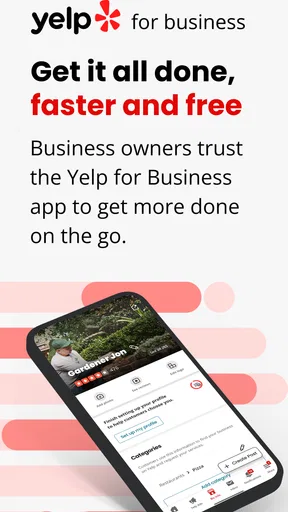
My first impression of Yelp for Business is that it makes the useful parts of a Yelp listing reachable when I’m away from a desk. For an owner or manager, the appeal is immediate: check the business presence, keep details current, and respond to customer activity from a phone. I would treat it as a practical companion to running a listing, not as a replacement for the work of delivering a good customer experience.
Why the first week feels useful
In the first few days, the main benefit is visibility into what customers are saying and asking. If you have just claimed a business listing, it is reassuring to have a place to check reviews and messages without waiting until you are back at a computer. The app is free, and Yelp, Inc is the developer. It is a business app rather than a general-purpose social network, so its value depends on whether Yelp matters to the people who might choose your business.
The practical first task is to review the public-facing information carefully. A wrong opening detail or an outdated description can create avoidable friction for someone deciding whether to visit. I’d use the phone interface for small corrections and routine checks, while taking more time for anything that needs careful wording. A mobile app encourages quick action, but a rushed edit to a public listing can create a different problem from the one it was meant to solve.
Its store rating is a 3.7 average from around 12,000 ratings, and it has more than a million installs. That gives a prospective user a sense of adoption, but I would not take popularity as proof that it will suit every business. The relevant question is whether your customers actually use Yelp to discover or evaluate services in your area. If they do, checking the listing and answering genuine questions can become a sensible part of opening or closing routines.
Turning customer activity into a habit
The app is most useful when it supports a repeatable habit rather than an occasional burst of attention. I would check for unanswered messages and new reviews at a set point in the day, then deal with each item deliberately. That is better than constantly refreshing the app: frequent checking can distract from serving customers, while a predictable review window makes it less likely that a real question will be missed.
Consider a busy day at a small repair shop. A customer asks whether a particular service is available, while another leaves feedback after collecting an item. A manager can use the app to see both interactions and decide what needs a quick answer and what deserves a more considered response. The useful distinction is not simply positive versus negative; it is whether a message needs action, whether a review points to a recurring issue, and whether a public reply would help the next person reading the listing.
For replies, I find it helpful to draft the point before opening the response box: acknowledge the customer, address the specific issue, and avoid sharing personal details. A public response is also read by future customers, so it should not become an argument with one person. If a complaint requires checking what happened with staff, it is usually better to investigate first and reply later than to post a defensive answer in the moment. The app can make responding convenient, but it cannot supply the judgement or context that a good response needs.
Worth Reading Before You Choose

EA SPORTS FC Mobile 26 Is a Bigger Football Game, but It Takes Time

Flipboard Shows What News Apps Must Do Beyond the Feed

Switching to Android Auto Means Rethinking Your Driving Routine

Google Calendar Makes a Crowded Week Easier to Manage

Ludo King Makes the Most of the Minutes Between Plans

Baby Panda World Brings Quick Play to Modern Phones, but Its Game Library Feels Busy
What it can tell you, and what it cannot
The original appeal includes activity and analytics, but I would treat those figures as clues rather than a full picture of business performance. Views or leads can help you notice changes in interest; they do not, by themselves, show why someone chose you, whether a visit became a sale, or whether a quieter period came from a listing issue. The strongest use is to pair what you see in the app with what you hear from customers and what happens in the business itself.
A non-obvious workflow is to use reviews as a lightweight quality log. If several customers mention the same point, note it outside the app and check whether it appears in day-to-day operations too. A review is one person’s account, not an automatic instruction to change a process, but patterns can reveal a confusing booking step, an unclear service description, or an expectation that staff should explain more clearly. This turns the app from a response tool into a prompt for useful internal follow-up.
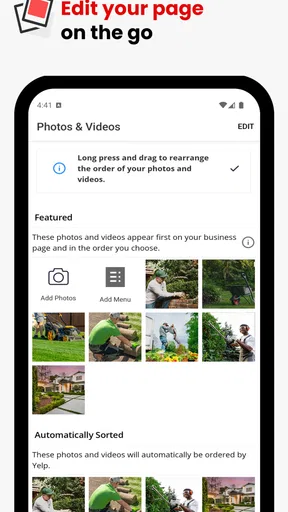
Photos and business updates can help a listing feel current, but I would not add material simply to keep the page busy. Choose images that answer a customer’s practical question or show something they need to recognize before visiting. Before publishing, check that the image and wording match the actual service and current offering. A small number of accurate, useful updates is more credible than frequent posts that do not give customers anything new to act on.
Where it fits among the alternatives
Compared with managing a listing through a desktop browser, the phone app is better suited to quick checks and timely replies while you are away from the counter. A browser can be more comfortable for longer edits or reviewing information on a larger screen. I would not frame one as a universal replacement for the other: the app is convenient for routine attention, while a computer may be preferable when a task calls for careful reading, several edits, or a longer response.
Compared with broad social platforms, Yelp has a more review-centered purpose. Social accounts can be a better home for regular community updates, promotions, or content aimed at existing followers; Yelp is more relevant when a potential customer is evaluating a business through its listing and customer feedback. If your audience rarely uses Yelp, keeping the app in a daily routine may not be worthwhile. It makes sense to focus first on the channels your customers actually consult rather than treating every platform as equally important.
It is also different from a private customer-service inbox. Public reviews can influence how later visitors understand the business, so an answer needs more care than a private note. Messages, by contrast, are useful for direct questions that do not need a public exchange. Knowing which channel suits the conversation is a small but important way to avoid exposing details or turning a simple service issue into a public back-and-forth.
Maintenance, friction, and who should skip it
The ongoing work is not difficult to describe, but it does require attention: keep the listing accurate, check for customer activity, and respond with care. That maintenance can feel worthwhile when Yelp brings meaningful discovery or inquiries. It can feel like an extra chore when nobody on the team owns the task or when the business has little activity there. I would decide who checks the app and when, rather than assuming every employee will notice a notification and know how to handle it.
One source of fatigue is the emotional weight of public feedback. A critical review can feel personal, especially after a demanding shift, and the convenience of a phone can make it tempting to answer immediately. I recommend separating the alert from the response: read it, gather the relevant facts, and return to it when you can write calmly. This is not a way to avoid criticism; it is a way to keep a public reply useful and professional.
Another trade-off is that a business owner may spend time interpreting activity without being able to connect it cleanly to an outcome. Use the analytics as directional signals, not as a verdict on the team or a promise of future sales. If you need detailed operational reporting across several sources, a dedicated analytics or customer-management tool may be a better fit. This app’s strongest role is the Yelp-facing work, not every part of running a business.
Yelp for Business is a better match for owners and managers who want to stay responsive to Yelp customers and can give the listing regular attention. It may be less useful for businesses whose customers rely on other discovery channels, or for people who want one app to manage every marketing and operations task. It is available free, carries an Everyone content rating, and the current version is 26.23.0-28262301, with a minimum operating-system requirement of version 9. Those details make it straightforward to consider, but the deciding factor is still whether Yelp is a meaningful place for your customers.
Getting Started with Yelp for Business
So, you’ve decided to dive into the world of Yelp. Awesome choice! Setting up is a breeze. Once you download and install the app on your Android or iOS device, you’ll be prompted to claim your business. If you haven’t already, you’ll need to create an account. This is where the fun begins.
Claiming your business is crucial because it allows you to control the narrative. You can update business information, add photos, and respond to reviews. It’s all about making that first digital impression count. Plus, the app's interface is pretty intuitive, so you won’t need a Ph.D. in technology to navigate through it.
Features That Make a Difference
One of the features I absolutely love is the ability to manage reviews. Let’s be real, reviews can make or break a business. With Yelp for Business, you can respond to customers directly, which is a fantastic way to show appreciation or address concerns. It’s like having a direct line to your clientele.
Another standout feature is the analytics section. Who doesn’t love a good stat? You can track how many people view your page, see engagement metrics, and even analyze customer leads. This data is gold for understanding your audience and tweaking your strategies.
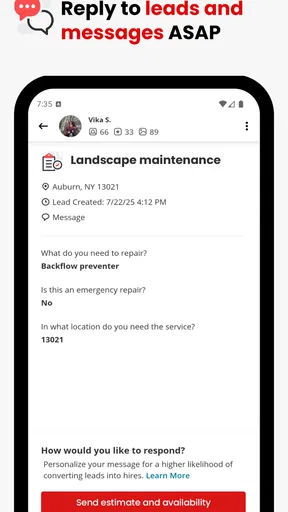
Oh, and let’s not forget about the messaging feature. Customers can reach out directly through the app, making communication seamless and efficient. Whether it’s answering a quick question or addressing a complaint, you’re always in the loop.
How It Stands Out
Now, you might be wondering, "Why Yelp when there are so many platforms out there?" The answer is simple: community trust. Yelp is one of the most trusted platforms for reviews, and having a strong presence here can significantly boost your business’s credibility.
The app isn’t just about managing reviews; it’s about building a brand. With the ability to showcase your business through photos and updates, you engage with customers on a whole new level. Plus, the exposure can lead to increased foot traffic and sales. It’s a win-win!
Another unique aspect is the advertising options. If you’re looking to give your business an extra push, Yelp offers ad solutions to help you reach a broader audience. It’s perfect for those times you want to stand out in a crowded market.
Final Thoughts
All in all, Yelp for Business is a must-have tool for any business owner looking to enhance their online presence. It's user-friendly, packed with features, and backed by a community that values honest reviews. While it’s not without its challenges (hello, occasional unhappy customers!), the benefits far outweigh the cons.
So, if you’re ready to take your business to the next level, give Yelp for Business a shot. It’s like having a digital storefront that works 24/7, ensuring you never miss out on potential customers. Trust me, your future self will thank you.
Pros
- User-friendly interface for easy navigation.
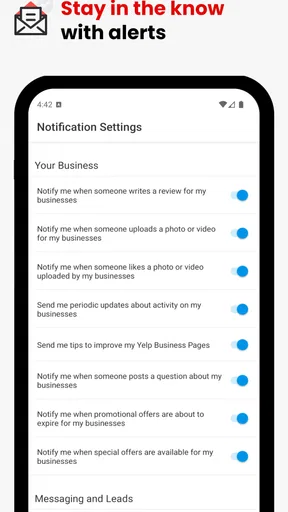
- Real-time notifications for customer reviews.
- Analytics provide valuable business insights.
- Seamless integration with Google Maps.
- Free to use with optional premium features.
Cons
- Limited customization for business profiles.
- Occasional delays in review postings.
- Some features require premium subscription.
- Can be overwhelming for new users.
- Limited support for non-English languages.
FAQs for Yelp for Business
What is Yelp for Business, and how does it work?
Yelp for Business is a platform that allows business owners to manage their Yelp presence. Users can claim their business page, update information, respond to reviews, and track visitor engagement metrics. This app helps businesses enhance their online reputation and interact directly with customers, providing tools for marketing and advertising.
How can I claim my business on Yelp for Business?
To claim your business on Yelp for Business, you need to create an account or log in to Yelp. Search for your business, and if it’s listed, click the ‘Claim’ button. Follow the verification steps, which may include phone or email confirmation, to ensure you are the rightful owner of the business.
What features does Yelp for Business offer to improve customer interaction?
Yelp for Business offers several features for customer interaction, including responding to reviews, messaging customers directly, and posting updates or special offers. The app also provides insights into customer engagement, allowing businesses to understand their audience better and tailor their interactions accordingly.
Are there costs associated with using Yelp for Business?
While claiming and managing a business page on Yelp is free, there are paid options available. Businesses can opt for advertising solutions to enhance visibility and reach a broader audience. These options include enhanced profiles and targeted advertising, helping businesses attract more customers.
How can Yelp for Business help with marketing and advertising?
Yelp for Business provides tools for effective marketing and advertising, such as promoting special offers, creating targeted ad campaigns, and enhancing business profiles with photos and videos. These features help businesses increase visibility and attract more customers by standing out in search results.


